

You’ve probably already used Skyscanner to compare flight prices, but simply choosing the lowest number isn’t always the smartest way to save money. The biggest savings often come from changing your dates, airports, destinations, and search settings. In this guide, we’ll show you how to find cheap flights on Skyscanner, compare better alternatives, and check the real cost before booking.
Key Takeaways
- Skyscanner cheap flights are airfare options found through Skyscanner’s flight-search and comparison platform.
- Flexible travel dates can help you discover lower-priced flights across different departure and return dates.
- Everywhere and flexible-date searches can reveal cheaper destinations and travel periods.
- Nearby airports and connecting flights can sometimes provide lower-cost alternatives.
- The cheapest advertised fare is not always the cheapest overall trip after baggage and other costs.
- Price Alerts can help you monitor fare changes when you’re not ready to book.
- Comparing several combinations of dates, destinations, airports, and flight types can improve your chances of finding a better fare.
What Are Skyscanner Cheap Flights?
Skyscanner cheap flights are airfare options found through Skyscanner’s flight-search and comparison platform, which allows travelers to compare available flights across different airlines and booking providers. Skyscanner describes itself as a travel search engine that helps users find low-priced flights for a route.
Moreover, Skyscanner currently says its platform compares flight deals from more than 1,000 providers, while its site also states that more than 100 million travelers use the service. — Source: Skyscanner, 2026.
For example, instead of checking five airline websites individually, you can search one route on Skyscanner and compare multiple available options in one place.
Skyscanner compares fares; it does not guarantee that every displayed fare will always be the absolute cheapest available. Prices can change, and availability may disappear before you complete a booking.
Why Do Skyscanner Cheap Flights Matter?
Finding cheap flights on Skyscanner matters because comparing dates, airports, destinations, and flight options can help travelers identify lower-cost alternatives. A small change to your itinerary can sometimes produce a meaningful difference in airfare.
For example, a traveler flying from Delhi to London on Friday could compare Thursday, Saturday, and Sunday departures instead of searching only one fixed date.
Moreover, flexibility becomes especially valuable when you are traveling for leisure rather than attending a fixed event. Skyscanner’s flexible-date tools allow travelers to examine broader date ranges and identify lower recent fares.
The most effective cheap-flight strategy is comparison rather than relying on one fixed search.
How Can You Find Cheap Flights on Skyscanner?
You can find cheap flights on Skyscanner by comparing your route, dates, airports, flight types, and booking options before choosing a fare.
1. Start With Your Departure Airport
First, enter the city or airport you can realistically depart from. Then consider whether nearby airports could work for your trip.
For example, someone traveling from Delhi might compare the normal departure airport with other practical airports if transportation costs make the alternative worthwhile.
2. Compare Flexible Dates
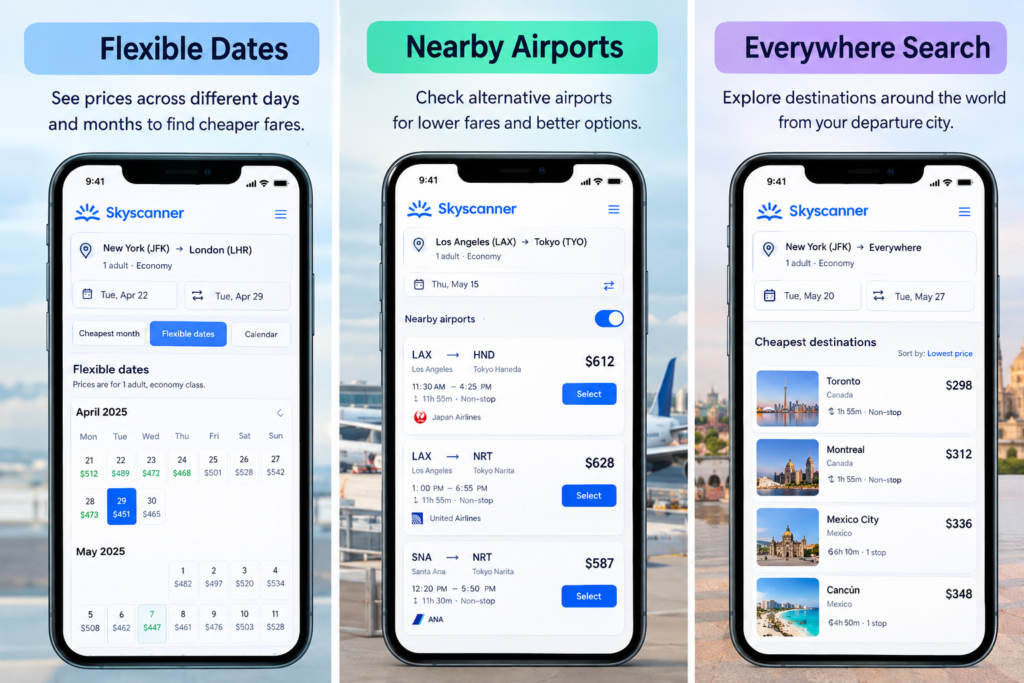
Next, avoid assuming that your first chosen date is the cheapest date. Skyscanner’s flexible-date tools can show prices across a month or help identify a cheaper month.
For example, if a Monday flight costs more than a Wednesday flight, shifting your trip by two days could reduce the airfare.
Flexible dates can help travelers identify lower-priced flight options by allowing them to compare fares across multiple departure and return dates.
3. Compare the Results Carefully
Then compare more than the headline price. Check departure times, stops, baggage, airports, duration, and booking provider.
For example, a flight that is $20 cheaper may require an expensive checked bag or a long overnight connection.
4. Check the Booking Provider
Finally, review who will handle your reservation. Skyscanner explains that users generally complete bookings with an airline or travel partner after selecting a flight, although some bookings may be completed directly with Skyscanner.
What Is the Cheapest Way to Search for Flights on Skyscanner?
The cheapest way to search on Skyscanner is to maximize flexibility before narrowing your search to a specific itinerary.
Use Flexible Dates or Cheapest Month
First, choose flexible dates when your schedule allows it. Skyscanner’s current guidance says users can search for a whole month, cheapest month, or broader date ranges.
Importantly, Skyscanner notes that flexible-date prices are estimated prices based on fares found by users in the previous eight days, so they should be treated as a planning guide rather than a guaranteed live fare. — Source: Skyscanner, 2026.
Try Everywhere Search
Second, use Everywhere when you know where you’re departing from but are flexible about the destination.
For example, instead of searching “Delhi to Paris,” enter your departure point and select Everywhere. Skyscanner can then show destinations ordered by price, making it easier to discover inexpensive alternatives.
Everywhere search is particularly useful when the destination is flexible but the travel budget is fixed.
How Does Skyscanner Find Cheap Flight Prices?
Skyscanner finds flight prices by comparing available airfare options across airlines and travel providers. The platform brings multiple options together so travelers can evaluate prices, schedules, and other itinerary details.
Moreover, Skyscanner’s current flight-search page states that it compares deals from more than 1,000 providers. — Source: Skyscanner, 2026.
For example, two providers may offer different prices for similar flights, giving you an opportunity to compare before booking.
That being said, airfare is dynamic. A price shown during one search can change before you complete the reservation.
How Can Skyscanner’s Flexible Dates Help You Save Money?
Skyscanner flexible dates help you compare airfare across different travel days instead of locking yourself into one potentially expensive date.
First, select the flexible-date option and review the available calendar or month-based pricing. Skyscanner’s current guidance explains that the tool can highlight cheaper days and months using recent fare data.
For example, imagine your preferred travel window is July 10–17. If July 9–16 or July 12–19 shows significantly lower fares, you can decide whether the savings justify changing your plans.
Can Searching Nearby Airports Make Flights Cheaper on Skyscanner?
Searching nearby airports can sometimes reduce airfare when the alternative airport has lower fares or better availability. Skyscanner specifically recommends considering nearby airports when travelers have some flexibility.
For example, a traveler may compare two airports serving the same broad region and then calculate the additional cost of reaching each airport.
The key is to compare total trip cost, not just airfare.
| Option | What to Compare |
| Main airport | Fare, baggage, transport |
| Nearby airport | Lower fare, transfer cost |
| Direct flight | Higher fare vs. time saved |
| Connecting flight | Lower fare vs. longer journey |
How Do Skyscanner Price Alerts Help You Find Lower Airfares?
Skyscanner Price Alerts help travelers monitor fare changes for routes and dates they are interested in booking. Skyscanner says users can create alerts and receive notifications when prices change.
First, search for your route and selected dates. Then create a Price Alert through the available tracking option.
For example, if you are planning an international trip several months away, an alert can save you from repeatedly checking the same route manually.
Price Alerts are useful for monitoring airfare, but they do not guarantee that prices will fall.
Is the Cheapest Skyscanner Flight Always the Cheapest Overall Option?
The cheapest Skyscanner flight is not always the cheapest overall option because additional travel costs can change the final expense.
First, check the following before choosing a fare:
- Checked and cabin baggage
- Seat-selection charges
- Airport-transfer costs
- Long or overnight layovers
- Change and cancellation conditions
- Connection requirements
- Booking-provider policies
- Payment or service charges
- Airport location
For example, a $250 flight with expensive baggage and airport transfers could cost more overall than a $280 flight with better inclusions.
The cheapest advertised flight is not necessarily the cheapest overall trip.
What Should You Check Before Booking the Cheapest Flight on Skyscanner?
Before booking a cheap Skyscanner flight, verify the final price, baggage allowance, itinerary, cancellation or change conditions, and details of the airline or booking provider.
Moreover, check whether the fare is still available after you move from the comparison results to the booking page. Skyscanner notes that prices can change constantly and that month-view prices are estimates based on recent searches.
For example, never assume that a calendar price is the final amount until you reach the relevant booking stage.
A Simple Pre-Booking Checklist
- Confirm the final fare.
- Check baggage allowance.
- Review departure and arrival airports.
- Check layover duration.
- Review change and cancellation rules.
- Confirm the booking provider.
- Compare the total cost with at least one alternative.
How Can You Find Cheap International Flights on Skyscanner?
You can find cheap international flights on Skyscanner by combining flexible dates, nearby airports, destination flexibility, and careful fare comparison.
First, search multiple departure dates rather than one fixed date. Second, compare nearby airports when transportation is practical. Third, use Everywhere if you are flexible about the country or city.
For example, a traveler planning a European vacation could compare several cities instead of automatically selecting the most popular destination.
Flexible destinations can sometimes create more savings than endlessly searching for one fixed route.
What Are Practical Examples of Finding Cheaper Flights on Skyscanner?
Practical Skyscanner searches become cheaper when travelers change one variable at a time and compare the resulting total cost.
Example 1: Flexible by Three Days
A traveler needs to fly during the second week of August but can move the trip by three days. They should compare the entire available window instead of searching only the original dates.
Example 2: Willing to Use a Nearby Airport
A traveler finds a $300 flight from the main airport and a $240 flight from a nearby airport. If transportation to the second airport costs $25, the alternative may still save $35.
Example 3: Destination Is Flexible
A traveler simply wants an inexpensive international vacation. They can use Everywhere to compare destinations from their departure airport and then investigate the cheapest practical options.
The best cheap-flight search is usually the one that gives you more options before you make the final decision.
What Should You Do After Finding a Cheap Flight?
After finding a cheap flight, verify the itinerary and final booking conditions before completing the purchase.
First, compare the selected flight with at least one alternative. Next, confirm baggage, times, airports, connections, and cancellation conditions.
Then proceed to the airline or booking provider and verify the final price.
Skyscanner explains that bookings are generally completed with an airline or travel partner after a user selects a flight.
What Tools Can Help You Find Skyscanner Cheap Flights?
Skyscanner’s main money-saving tools include flexible-date searches, Everywhere, nearby-airport options, and Price Alerts.
Use the tools according to your situation:
- Fixed destination + flexible dates: Use Whole Month or Cheapest Month.
- Fixed dates + flexible destination: Use Everywhere.
- Fixed route + uncertain timing: Use Price Alerts.
- Flexible departure location: Compare nearby airports.
- Strict budget: Compare total trip cost rather than airfare alone.
Skyscanner also provides flight-search options that let travelers compare flights by factors such as price, speed, and emissions. — Source: Skyscanner, 2026.
What’s Next? How Should You Search for Cheap Flights?
The next step is to run several Skyscanner searches before deciding which itinerary offers the best value.
First, search your preferred route and dates. Second, test nearby dates. Third, check nearby airports. Fourth, try Everywhere if the destination is flexible. Finally, compare the total cost and booking conditions.
For example, spending ten minutes testing three different date combinations can reveal an option that your first search never showed.
Do not search for the cheapest flight only once; search strategically until you understand your realistic options.
Conclusion: How Can You Use Skyscanner to Find Better Airfare?
Skyscanner cheap flights are easiest to find when you use flexibility and comparison rather than relying on one fixed search. Flexible dates, Everywhere, nearby airports, Price Alerts, and careful fare checks can all help you identify better flight options.
Moreover, remember that the lowest headline fare is not necessarily the lowest total travel cost. Always check baggage, transfers, connections, booking conditions, and the final price before purchasing.
If your schedule allows flexibility, start by changing one variable at a time—date, airport, destination, or flight type. That simple approach can turn a basic Skyscanner search into a much more effective cheap-flight search.
A