
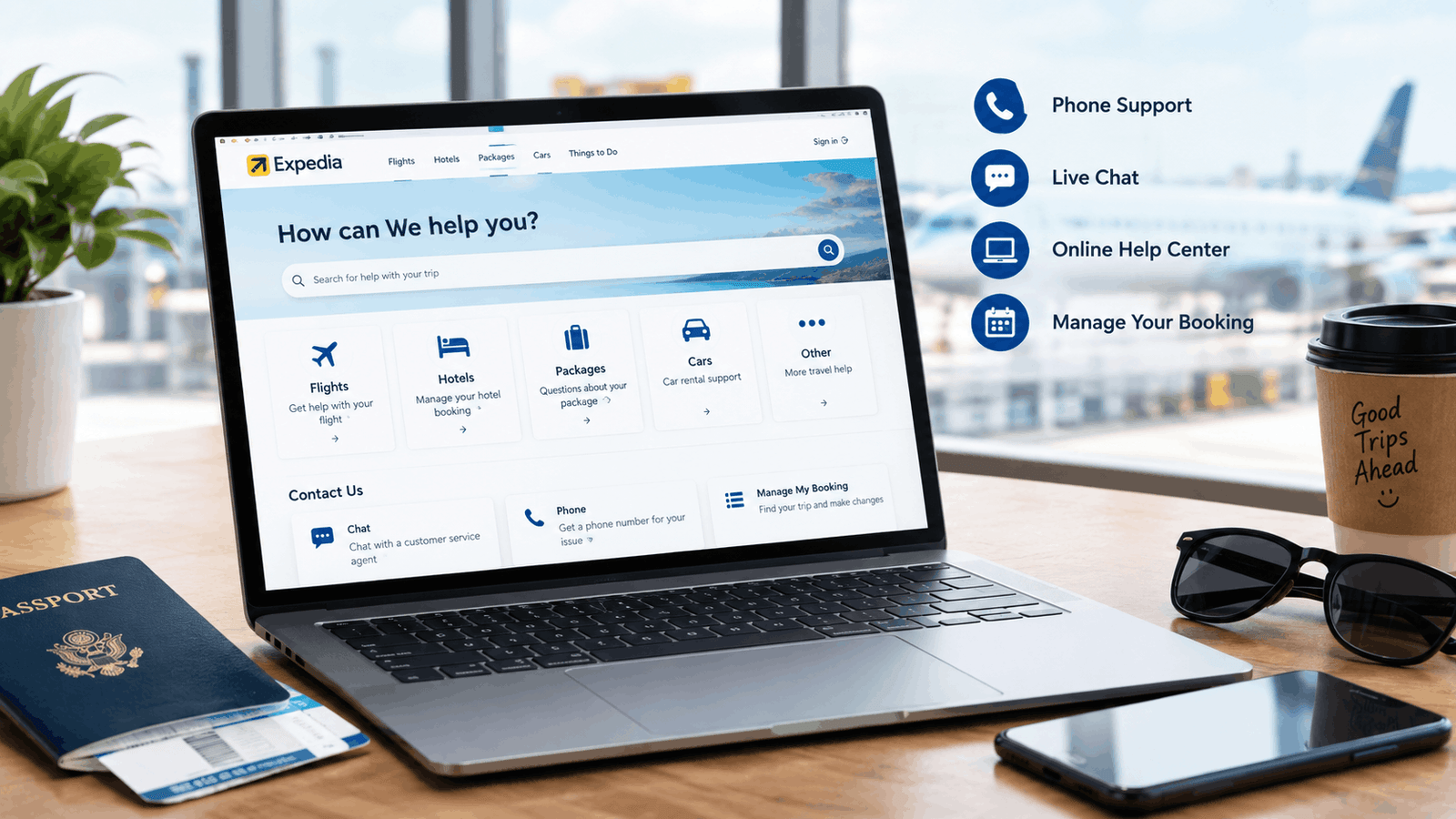
You’ve probably used Expedia to book flights, hotels, or vacations, but finding the right customer support option can be confusing when a cancellation, refund, or urgent booking issue arises. In this guide, you’ll learn how to find legitimate Expedia customer service, choose the correct support channel, handle common booking problems, and protect yourself from fake customer service numbers.
Key Takeaways
- Expedia customer support helps travelers with flights, hotels, vacation packages, cancellations, changes, refunds, payments, and account issues.
- The official Expedia website or app is the safest starting point for finding support connected to a specific booking.
- Booking and itinerary details help Expedia identify your reservation and understand the problem more efficiently.
- Cancellation and refund eligibility depends on the reservation terms and the policies of the airline, hotel, or other travel provider.
- Official Expedia support channels should always be verified before you provide personal or payment information.
- Passwords, one-time passcodes, and complete payment credentials should never be shared with someone claiming to be customer support.
- Confirmation emails, screenshots, receipts, and support correspondence can help when you need to follow up or escalate an unresolved issue.
What Is Expedia Customer Service and What Can It Help With?
Expedia’s customer service helps travelers manage their bookings and resolve issues related to flights, hotels, vacation packages, cancellations, changes, refunds, and accounts. The official Expedia Help Center offers dedicated sections for flights, refunds and fees, packages, stays, car rentals, cruises, activities, accounts, safety, and other travel-related topics.
Additionally, Expedia’s customer service page states that its agents are available 24/7, 365 days a year, with support available via chat and phone. Expedia also offers self-service booking management for eligible reservations.
For example, a traveler who needs to cancel their flight can begin the official Expedia support process instead of searching for a customer service number on Google.
Expedia’s customer service connects travelers with help for managing bookings, travel issues, and account-related questions.
What Problems Can Expedia Support Help With?
First, Expedia support can help you identify the appropriate process for common travel problems, including:
- Flight booking problems
- Hotel reservation questions
- Booking cancellations
- Reservation modifications
- Refund and charge questions
- Payment-related issues
- Itinerary and confirmation problems
- Account and login questions
- Vacation-package support
- Travel-document questions
For example, Expedia’s Help Center currently provides dedicated guidance for canceling hotel or vacation-rental bookings, canceling flights, understanding refunds, and viewing booking receipts.
Why Does Expedia Support Sometimes Depend on the Provider?
Secondly, changes and cancellations to Expedia reservations depend on the terms and conditions associated with the specific booking, including the policies of the airline, hotel, or other travel provider. This distinction is important because Expedia can facilitate the booking, while the underlying travel provider determines certain eligibility rules.
For example, a flight may have a cancellation policy imposed by the airline, while a hotel reservation may have a separate cancellation policy set by the hotel.
The terms and conditions of your Expedia reservation determine many of the available options for canceling, modifying, and obtaining refunds.
Why Is Expedia Customer Support Important?
Expedia customer support is important because legitimate support can help travelers resolve booking problems while reducing the risk of scams, incorrect cancellation procedures, and lost time. Expedia itself warns that fake Expedia phone numbers circulate online through misleading search advertisements and entire fraudulent pages.
Furthermore, Expedia’s platform serves a broad travel ecosystem, so reliable support is especially important when travelers have urgent bookings. Expedia Group recorded 57 million airline tickets booked in 2025, a 3% increase over 2024. — Source: Expedia Group, 2026
Additionally, Expedia Group recorded 415.4 million hotel nights booked in 2025, an 8% increase over 2024. — Source: Expedia Group, 2026
For example, if a traveler discovers a problem with their flight shortly before departure, using a verified Expedia customer service channel is safer than calling a number found on an unfamiliar website.
Why Should You Avoid Unverified Expedia Phone Numbers?
First, an unverified Expedia contact number can pose a serious security risk, as scammers could impersonate travel agency representatives. Expedia specifically advises travelers to verify they are using the official Expedia website or app before entering any sensitive information.
Furthermore, Expedia states that it will never ask for your password or one-time code, nor will it request that you pay for your trip with a gift card or bank transfer.
A legitimate interaction with Expedia customer service should never require you to reveal your password or one-time code.
How Can You Contact Expedia Customer Support?
Expedia customer support can be reached through the official Expedia website or app, including booking management, virtual-agent chat, and phone-support pathways. Expedia’s official customer-service page currently provides options for phone support, chat, and self-service booking management.
First, the safest approach is to begin at Expedia’s official Help Center rather than relying on a phone number displayed by a third-party website. The Help Center lets travelers search for assistance and provides category-specific support for flights, stays, packages, refunds, charges, accounts, and other travel products.
Open Expedia’s official Help Center
How Do You Contact Expedia Through the Website?
First, open Expedia’s official website and navigate to the Help Center or customer-service area. Then choose the relevant booking or problem so Expedia can direct you toward the appropriate support route.
A practical workflow is:
- Open the official Expedia website.
- Go to the Help Center or customer-service section.
- Sign in when possible to access customized booking assistance.
- Select the relevant travel product or issue.
- Use the available self-service, chat, or phone option.
- Keep your support confirmation or case information for follow-up.
For example, Expedia’s Help Center specifically encourages travelers to sign in for customized help, while also allowing visitors to browse support topics without signing in.
Can You Contact Expedia Through Chat?
Second, Expedia provides a virtual-agent chat option that can answer questions, help manage trips, and connect travelers with a human agent when necessary.
Moreover, chat can be useful when you need a written record of your conversation. Keeping that correspondence can make later follow-up easier if the first interaction does not resolve the problem.
Expedia’s official chat option can provide automated assistance and route customers to human support when needed.
What Is the Official Expedia Customer Service Number?
The safest way to get Expedia’s customer service number is through Expedia’s official support channel, rather than copying it from an unverified website. Expedia’s customer service page states that customers must answer a few questions before Expedia provides them with the phone number and the appropriate agent.
This method is important because support numbers can vary depending on the customer’s situation, booking, and location, and some fraudulent websites may publish numbers that appear legitimate.
For example, Expedia explicitly warns that fake phone numbers are circulating online and recommends verifying the official website or app before entering any sensitive information.
Use Expedia’s official customer-service page to reach phone support
Do not treat an unverified search result, advertisement, forum post, or social-media comment as proof that a phone number belongs to Expedia.
How Do You Contact Expedia About an Existing Booking?
Expedia booking support is easiest to navigate when you start with the reservation itself and provide accurate itinerary information. Expedia’s official support tools include booking-management options that allow travelers to make eligible changes or adjustments without necessarily starting with a phone call.
First, locate your Expedia confirmation email or sign in to the account used for the reservation. Then open the relevant itinerary and check the available management options.
What Information Should You Check in Your Itinerary?
Before contacting Expedia, review:
- Itinerary or reservation number
- Traveler name shown on the booking
- Flight, hotel, or package details
- Travel dates
- Cancellation or modification conditions
- Payment or charge information
- Confirmation emails
- Previous support correspondence
For example, if your hotel reservation has a nonrefundable condition, reviewing the booking terms before contacting support can help you understand why a requested refund may not be available.
Your itinerary is the most useful starting point for resolving an existing Expedia reservation problem.
What If You Cannot Find Your Booking?
Second, check the email account used to make the reservation and search for Expedia confirmation messages. If you have an Expedia account, signing in can also provide customized support and access to eligible booking information.
For example, searching your inbox for Expedia confirmation, itinerary, or the travel destination may help locate the original booking email.
If you still cannot identify the reservation, use Expedia’s official Help Center rather than submitting booking details to an unfamiliar website.
How Can You Get Help With an Expedia Flight Booking?
Expedia flight customer service helps travelers address flight-related questions through the official Expedia support and booking-management channels. Expedia’s Help Center includes a dedicated Flights category and provides guidance for flight cancellation, traveler rights, and related issues.
Moreover, Expedia Group reported 15.7 million booked air tickets in Q1 2026, representing 6% year-over-year growth. — Source: Expedia Group, 2026
First, identify whether your problem concerns the Expedia reservation itself or a change initiated by the airline. That distinction can affect the next step.
Common Expedia Flight Support Issues
Flight-related support can involve:
- Flight cancellation
- Schedule changes
- Itinerary corrections
- Fare or charge questions
- Refund requests
- Traveler-name issues
- Travel-document questions
- Airline disruption information
For example, if an airline changes your flight schedule, check your Expedia itinerary and the relevant flight-support guidance before requesting a separate change.
Flight support should begin with the booking record and the airline’s applicable reservation conditions.
How Can You Get Help With an Expedia Hotel Reservation?
Expedia hotel customer service helps travelers manage eligible stays, including cancellation questions, reservation changes, payment concerns, and property-related issues. Expedia’s Help Center provides a dedicated Stays category and specific guidance for canceling hotel or vacation-rental bookings.
First, review your hotel’s reservation conditions because hotel cancellation policies can vary significantly between properties and rate types.
What Should You Do About a Hotel Cancellation?
Second, open the reservation through Expedia’s official booking management tools and check if a cancellation option is available. If the reservation allows it, follow the on-screen cancellation process and save the confirmation.
For example, a flexible hotel rate might allow cancellation before a certain deadline, while another rate might have a cancellation fee or be non-refundable.
Hotel cancellation eligibility is determined by the conditions attached to the specific reservation.
What If the Hotel Has a Problem During Your Stay?
Third, document the issue clearly if the problem concerns the property itself. Keep relevant photos, messages, receipts, and details of conversations with hotel staff, while avoiding unnecessary sensitive information.
For example, if a promised room feature is unavailable, a written record of the issue and the property’s response can help when you later contact Expedia.
How Do You Cancel an Expedia Booking?
Expedia booking cancellation is completed through the reservation’s available cancellation options, but eligibility and potential charges depend on the booking’s terms. Expedia provides dedicated Help Center guidance for canceling flights and hotel or vacation-rental bookings.
First, sign in to Expedia and open the relevant itinerary whenever possible. Then review the cancellation conditions before confirming the cancellation.
Step-by-Step Expedia Cancellation Process
- Open your Expedia account or confirmation details.
- Select the relevant itinerary.
- Choose the cancellation or change option if available.
- Review the displayed terms, fees, and refund information.
- Confirm the cancellation only after checking the details.
- Save the cancellation confirmation.
For example, if Expedia shows a cancellation fee before you confirm, review that amount against your original booking terms before proceeding.
Always review the cancellation conditions before confirming an Expedia booking cancellation.
How Do You Request an Expedia Refund?
An Expedia refund request is handled according to the reservation’s refund conditions, the applicable provider policy, and the reason for the cancellation or disruption. Expedia’s Help Center provides specific guidance covering refund basics and refund processes.
First, determine whether the booking is eligible for a refund before assuming that a cancellation automatically produces one.
What Affects an Expedia Refund?
Several factors can affect the outcome:
| Factor | Why It Matters |
| Booking type | Flights, hotels, packages, and other products can have different rules |
| Cancellation terms | The reservation may be refundable, partially refundable, or nonrefundable |
| Travel provider | Airline or hotel policies can affect eligibility |
| Timing | Cancelling before or after a deadline can change the result |
| Reason for disruption | Provider-initiated changes can follow different procedures |
| Payment method | Refund processing can depend on the original payment arrangement |
For example, an airline-initiated schedule change may require a different resolution from a voluntary cancellation made by the traveler.
A refund is not automatically guaranteed simply because an Expedia reservation was canceled.
How Do You Track a Refund?
Second, retain the cancellation confirmation and any refund information displayed during the support process. If the expected refund does not appear within the applicable timeframe, use Expedia’s official support channel and provide the original reservation information.
For example, a support representative can use the itinerary information to identify the booking and review the recorded refund status.
What Information Do You Need Before Contacting Expedia Customer Support?
Travelers should have their itinerary or reservation details available before contacting Expedia customer support so the relevant booking can be identified quickly. Expedia’s support system is designed around specific travel products and booking information, making accurate reservation details especially useful.
First, prepare the following information before starting a support conversation:
- Itinerary or reservation number
- Name on the booking
- Travel dates
- Flight, hotel, or package information
- Date the booking was created
- Description of the problem
- Relevant confirmation emails
- Previous case or conversation details
- Appropriate payment-reference information, when requested through an official channel
For example, saying “My hotel booking is scheduled for October 12 and the cancellation option is unavailable” is more useful than simply saying “My booking isn’t working.”
What Information Should You Never Share?
Second, protect sensitive security information even when someone claims to represent Expedia. Expedia states that it will never ask for your password or one-time passcode, and it warns customers about fraudulent support contacts.
Never provide an unverified person with:
- Your account password
- One-time passcodes
- Security codes
- Complete payment-card credentials
- Online-banking credentials
- Remote access to your computer or phone
Legitimate Expedia support should not require you to disclose your password or one-time passcode.
What Should You Do If Expedia Customer Support Does Not Resolve Your Issue?
If Expedia customer support does not resolve your issue, document the interaction, review the booking terms, and follow up through an official Expedia support channel. Keeping a clear record creates a useful timeline of what happened and what resolution you requested.
First, record the date and time of the interaction, the issue discussed, and any case or reference information provided.
Second, gather supporting evidence such as:
- Booking confirmation
- Cancellation confirmation
- Refund information
- Screenshots
- Relevant emails
- Receipts
- Previous support conversations
Third, return to Expedia’s official support system and explain that the issue remains unresolved. Provide the existing case information rather than starting the explanation from scratch.
Good documentation makes unresolved booking problems easier to explain and follow up on.
What If a Third Party Is Involved?
Moreover, determine whether the problem originates with Expedia or the underlying travel provider. Expedia’s platform covers multiple travel products, and provider-specific terms can influence how reservations are changed or refunded.
For example, a hotel may have its own property policy while an airline controls flight operational decisions.
If the issue involves a third-party provider, review the relevant provider’s official policy while continuing to use Expedia’s official support route when Expedia manages the reservation.
What Tools Can You Use to Get Expedia Booking Help?
The most useful Expedia support tools are the official Help Center, booking-management interface, virtual-agent chat, and phone-support pathway. Expedia’s customer-service page explicitly lists these options and directs customers through questions before providing the appropriate phone route.
1. Expedia Help Center
First, the Expedia Help Center is the best starting point for general troubleshooting and issue-specific instructions. It organizes support into categories such as flights, refunds and charges, packages, stays, cars, cruises, accounts, privacy, and security.
2. Expedia Customer-Service Page
Second, Expedia’s customer-service page provides access to phone support, chat, and self-service booking management. The page also contains fraud-prevention warnings that are particularly useful when searching for an Expedia customer service number.
Open Expedia customer service options
3. Expedia App
Third, the Expedia app can be useful when you are traveling because it allows you to manage trip information from a mobile device. Expedia also promotes its app as a way to manage travel while on the go.
4. Free Verification Resources
Finally, you do not need a paid third-party service to verify whether a support route is legitimate. The official Expedia website and app are the primary resources you should use before sharing booking or security information.
Suggested Visual Diagram
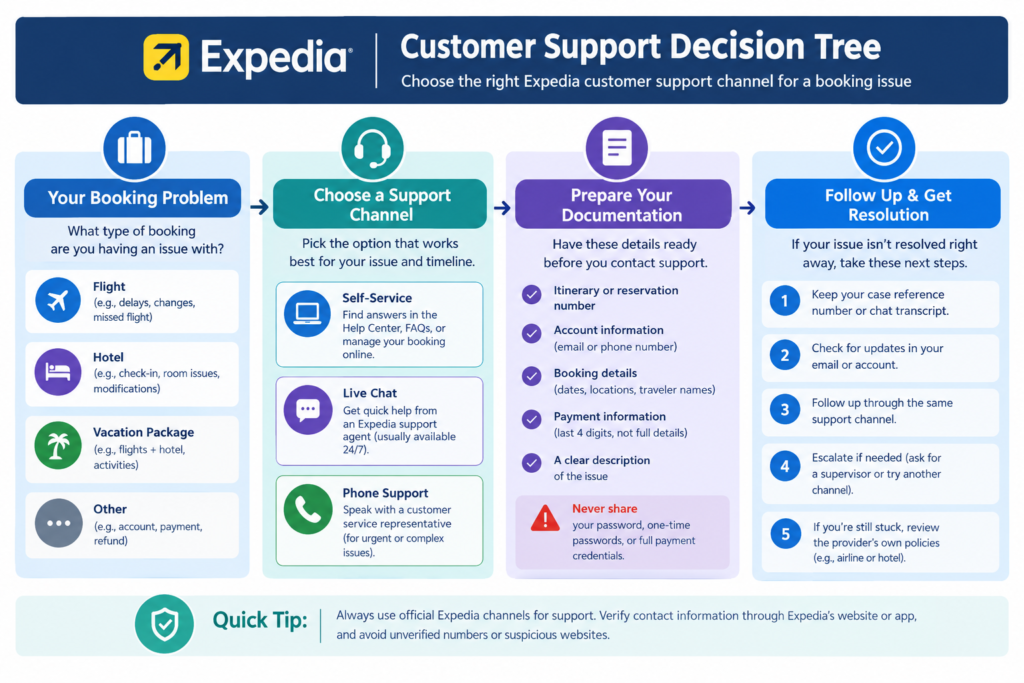
What’s Next? How Can You Resolve Your Expedia Booking Issue Faster?
Resolving an Expedia booking issue faster starts with identifying the exact problem, opening the official support route, preparing your booking information, and documenting every important interaction. A focused support request is generally easier to handle than a vague description of the problem.
First, use this quick checklist:
Expedia Customer Support Quick Checklist
1. Identify the problem.
Decide whether you need help with a flight, hotel, package, cancellation, refund, payment, account, or itinerary.
2. Open an official Expedia channel.
Start with the official Help Center, customer-service page, or Expedia app.
3. Find your reservation.
Keep your itinerary or confirmation information ready.
4. Review the booking terms.
Check cancellation, modification, and refund conditions before requesting a change.
5. Choose the appropriate support method.
Try self-service when the option is available; otherwise use chat or the official phone pathway.
6. Explain the issue clearly.
State what happened, what you already tried, and what resolution you need.
7. Save your records.
Keep confirmation emails, screenshots, case details, and support correspondence.
8. Follow up if necessary.
Use official Expedia support again if the first interaction does not resolve the problem.
For example, instead of saying “I need help with my trip,” say “My Expedia hotel reservation for October 12 cannot be canceled even though the booking confirmation says cancellation is allowed.”
The fastest support path is usually the one that starts with accurate booking information and a clearly defined problem.
Conclusion: Use the Right Expedia Support Channel for Your Booking
Expedia customer support helps travelers manage bookings and address problems involving flights, hotels, packages, cancellations, refunds, payments, and accounts. The safest way to find Expedia support is to start with Expedia’s official website or app and use the support options associated with your booking.
In addition, Expedia’s official customer service page offers phone, chat, and self-service options, while its Help Center organizes support by travel product and issue.
Most importantly, avoid unverified Expedia customer service numbers and suspicious websites. Expedia specifically warns against fake phone numbers and states that it will never ask for passwords or one-time codes.
Finally, keep your itinerary, cancellation confirmations, screenshots, and correspondence with support until the issue is completely resolved. By using Expedia’s verified support channels and protecting your confidential information, you can manage booking issues more safely and efficiently.
If you’re planning another trip, check out our guide to Skyscanner Cheap Flights for practical tips on finding lower airfares.